

Cách tách trang trong word dễ dàng chỉ trong 5p


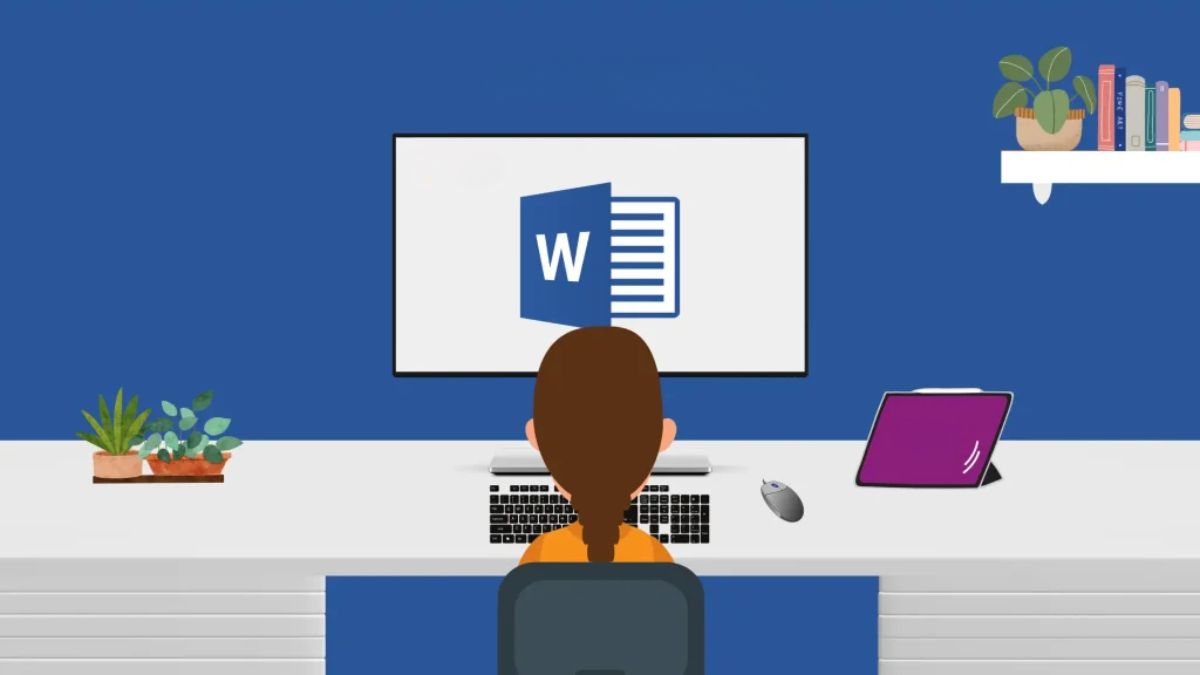
Bạn đang làm việc trên Microsoft Word và cần phải thực hiện cách tách trang trong Word một cách nhanh chóng và dễ dàng? Không cần phải lo lắng nữa! Trong bài viết này, chúng tôi sẽ hướng dẫn bạn cách tách trang văn bản trong Word chỉ trong vòng 5 phút. Với các bước đơn giản sau đây, bạn sẽ có thể chia nhỏ tài liệu thành các phần một cách hiệu quả.
Nội dung
Những lợi ích tuyệt vời của cách tách trang trong Word
Việc tách trang trong Word không chỉ giúp tạo ra sự trình bày chuyên nghiệp cho tài liệu của bạn mà còn mang lại nhiều lợi ích tuyệt vời khác. Một trong những lợi ích quan trọng nhất của việc tách trang là tạo ra cấu trúc rõ ràng cho tài liệu. Bằng cách chia nhỏ tài liệu thành các phần riêng biệt, bạn có thể dễ dàng tổ chức, chỉnh sửa và quản lý nội dung một cách hiệu quả hơn.
Ngoài ra, cách tách trang trong Word cũng giúp tạo ra các trang trắng, tạo điểm dừng giữa các phần khác nhau của tài liệu, tạo ra sự phân cách và sự chuyên nghiệp cho trang bìa, mục lục, hoặc các phần khác. Cuối cùng, việc tách trang giúp tạo ra định dạng đẹp mắt và dễ đọc cho tài liệu, tăng tính thẩm mỹ và sự chuyên nghiệp của nó.
Cách tách trang trong Word dễ dàng chỉ trong 5p
Bạn đang gặp khó khăn trong việc tách trang trong Word? Đừng lo lắng, bài viết này sẽ hướng dẫn bạn 3 cách đơn giản để thực hiện việc này chỉ trong 5 phút ở ngay dưới dây:
Cách tách trang trong Word sử dụng phím tắt
Sử dụng phím tắt là một cách đơn giản và nhanh chóng để tách trang trong Word. Khi bạn cần tách trang tại một điểm cụ thể trong tài liệu, chỉ cần đặt con trỏ tại vị trí đó và nhấn tổ hợp phím “Ctrl” + “Enter” trên bàn phím. Word sẽ tự động tạo ra một trang mới từ vị trí con trỏ của bạn, giúp bạn dễ dàng phân chia và tổ chức tài liệu một cách linh hoạt.
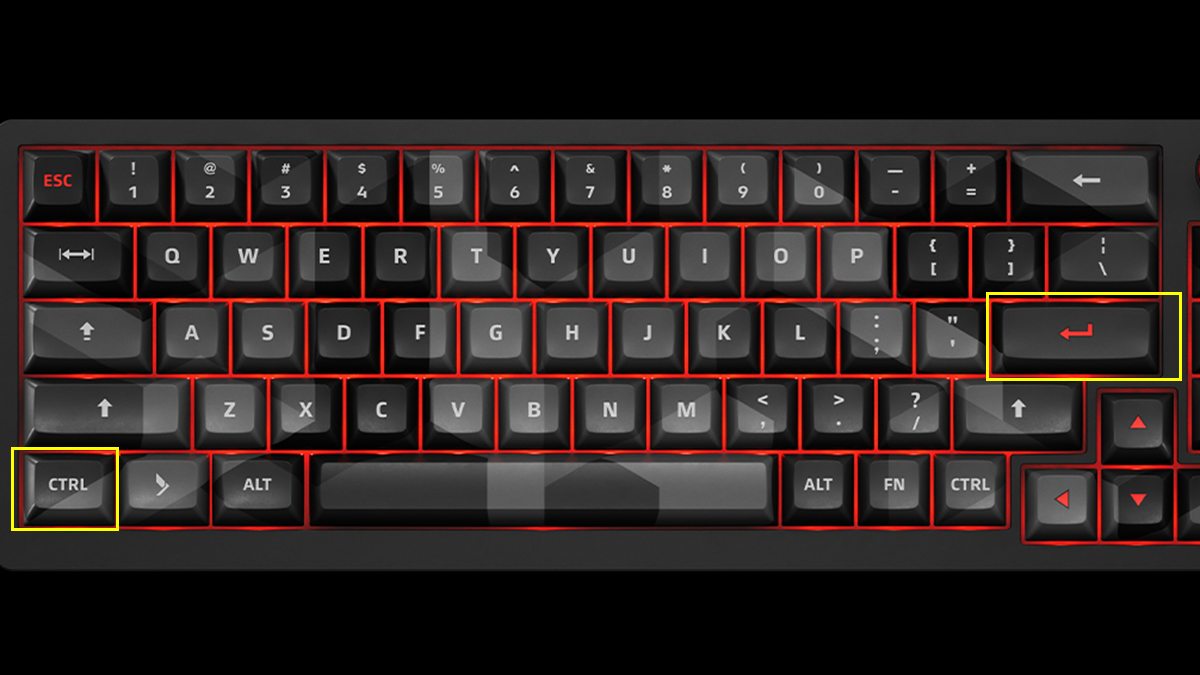
Việc sử dụng phím tắt không chỉ giúp tiết kiệm thời gian mà còn tăng hiệu suất làm việc của bạn. Bằng cách nhớ và áp dụng tổ hợp phím “Ctrl” + “Enter”, bạn có thể nhanh chóng tách trang và tiếp tục công việc mà không bị gián đoạn.
Sử dụng cách chèn Page Breaks
Page Breaks là một tính năng mạnh mẽ trong Word cho phép bạn tách trang linh hoạt tại bất kỳ điểm nào trong tài liệu của bạn. Để sử dụng Page Breaks, bạn chỉ cần đặt con trỏ tại vị trí mà bạn muốn tách trang, sau đó chọn tab “Chèn” trên thanh công cụ của Word. Tiếp theo, từ menu, chọn “Page Break” và Word sẽ tự động tạo ra một trang mới từ vị trí đó.
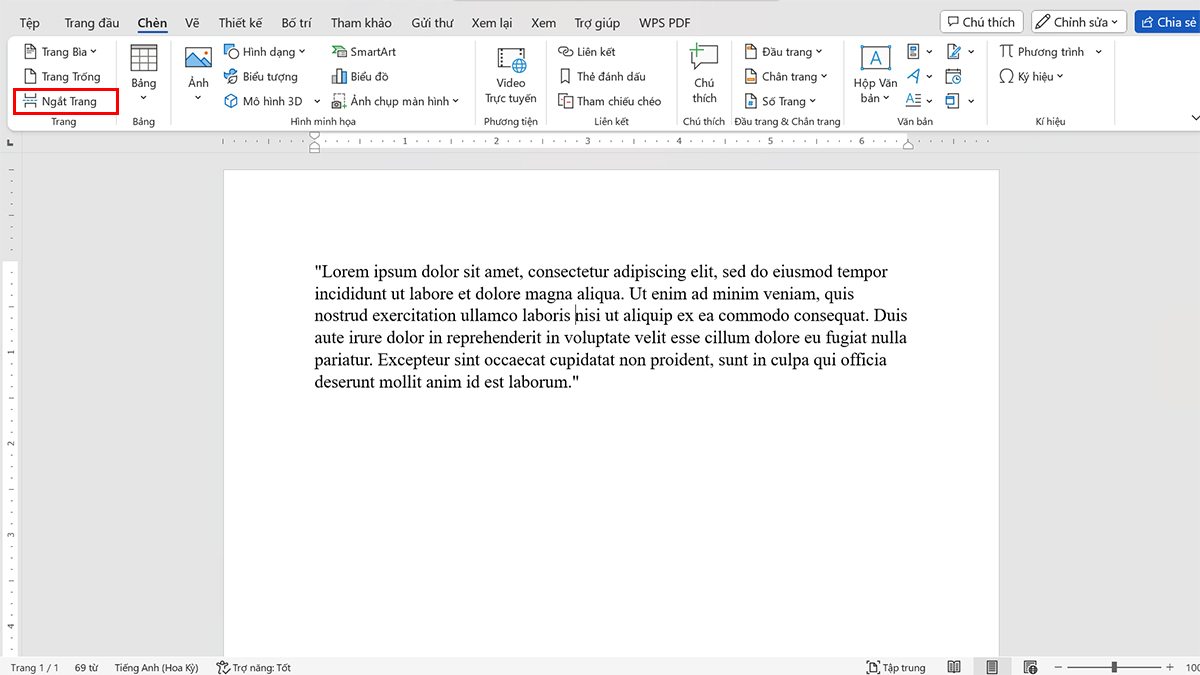
Sử dụng Page Breaks giúp tạo ra các trang mới một cách chính xác và dễ dàng kiểm soát cấu trúc của tài liệu. Bạn có thể sử dụng tính năng này để tách trang giữa các phần của tài liệu, tạo ra trang trắng hoặc chèn trang vào vị trí mong muốn một cách linh hoạt, giúp tài liệu của bạn trở nên dễ đọc và dễ quản lý hơn.
Sử dụng tab “Bố trí”
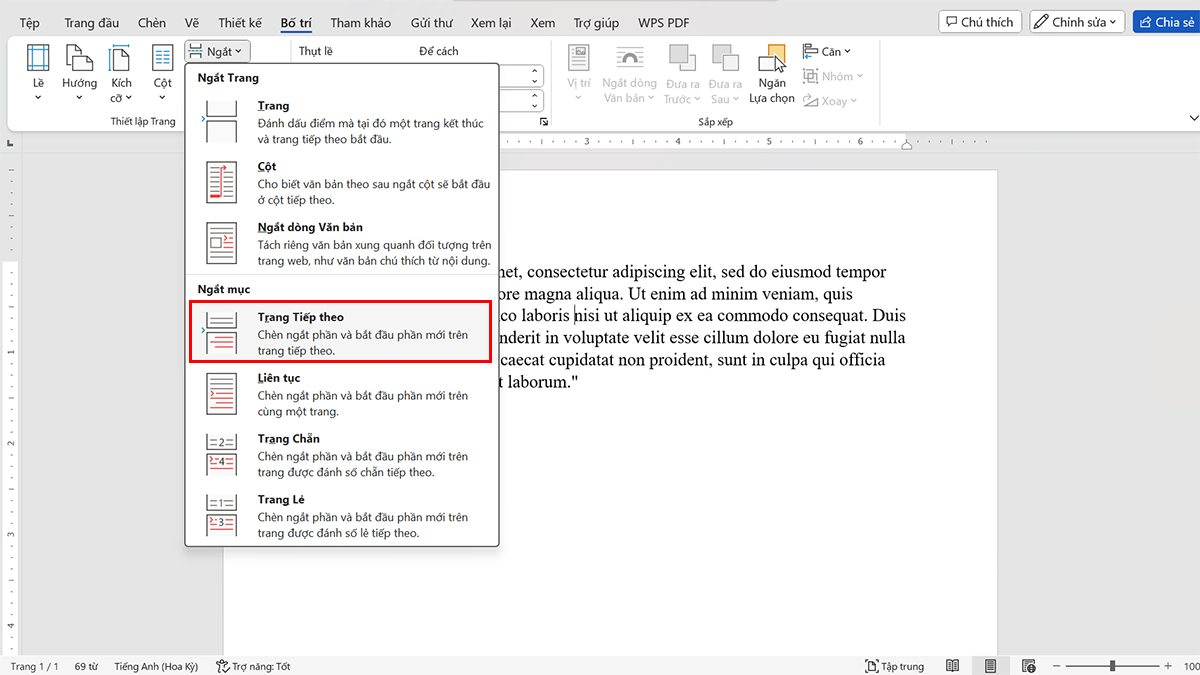
Tab “Bố trí” trên thanh công cụ của Word chứa nhiều tùy chọn giúp bạn tạo ra cấu trúc trang một cách linh hoạt và chuyên nghiệp. Để thực hiện cách tách trang trong Word bằng cách sử dụng “Bố trí”, bạn có thể làm theo các bước sau:
- Bước 1: Di chuyển con trỏ đến vị trí mà bạn muốn tách trang.
- Bước 2: Click vào tab “Bố trí” trên thanh công cụ của Word.
- Bước 3: Trong nhóm “Thiết lập Trang”, bạn sẽ thấy một nút gọi là “Ngắt”. Click vào đó.
- Bước 4: Trong menu drop-down, chọn “Trang tiếp theo”.
Trên đây là những cách dễ dàng và nhanh chóng để thực hiện cách tách trang trong Word chỉ trong vòng 5 phút. Dù bạn là người mới sử dụng Word hay đã làm việc với nó từ lâu, việc biết cách tách trang một cách hiệu quả sẽ giúp bạn quản lý tài liệu của bản thân một cách thông minh và dễ dàng hơn. Hãy áp dụng những phương pháp trên và trải nghiệm sự tiện lợi mà chúng mang lại!





Facts blog you possess here.. It’s obdurate to espy high calibre article like yours these days. I honestly recognize individuals like you! Rent vigilance!! finasteride propecia efectos secundarios
More posts like this would make the blogosphere more useful. buy furosemide medication
More articles like this would make the blogosphere richer. augmentin pills
I am in point of fact enchant‚e ‘ to glitter at this blog posts which consists of tons of useful facts, thanks for providing such data. https://prohnrg.com/product/metoprolol-25-mg-tablets/
This is the gentle of literature I in fact appreciate. https://ondactone.com/spironolactone/
I am in truth delighted to gleam at this blog posts which consists of tons of useful facts, thanks towards providing such data.
https://doxycyclinege.com/pro/ranitidine/
I couldn’t turn down commenting. Warmly written! http://www.dbgjjs.com/home.php?mod=space&uid=531988
order dapagliflozin 10 mg sale – janozin.com buy generic forxiga
xenical medication – orlistat cheap orlistat 60mg sale
I’ll certainly bring back to review more. http://fulloyuntr.10tl.net/member.php?action=profile&uid=3200
You can shelter yourself and your ancestors close being wary when buying medicine online. Some pharmacopoeia websites function legally and offer convenience, privacy, sell for savings and safeguards as a replacement for purchasing medicines. buy in TerbinaPharmacy https://terbinafines.com/product/compazine.html compazine
The thoroughness in this section is noteworthy. TerbinaPharmacy
Lovely blog! I am loving it!! Will be back later to read some more. I am bookmarking your feeds also
I am often to running a blog and i really recognize your content. The article has really peaks my interest. I’m going to bookmark your website and keep checking for brand new information.
Hello my loved one! I wish to say that this post is awesome, nice written and include approximately all vital infos. I would like to peer extra posts like this .
Hi, Neat post. There is a problem with your web site in internet explorer, could check this?K IE still is the market chief and a good component to other folks will omit your wonderful writing due to this problem.
Your article helped me a lot, is there any more related content? Thanks! https://accounts.binance.info/de-CH/register?ref=W0BCQMF1
Would love to perpetually get updated great web site! .
Neat blog! Is your theme custom made or did you download it from somewhere? A theme like yours with a few simple adjustements would really make my blog jump out. Please let me know where you got your design. Thanks a lot
I have been surfing on-line greater than three hours lately, but I never discovered any fascinating article like yours. It’s beautiful value sufficient for me. In my view, if all website owners and bloggers made good content as you did, the web shall be a lot more useful than ever before.
Hi, i believe that i saw you visited my web site thus i came to “go back the choose”.I’m trying to find issues to enhance my website!I suppose its adequate to make use of some of your ideas!!
https://t.me/s/Beefcasino_officials
For the reason that the admin of this website is working, no hesitation very soon it will be renowned, due to its feature contents.
Hello! I’ve been reading your site for a long time now and finally got the bravery to go ahead and give you a shout out from Lubbock Texas! Just wanted to mention keep up the great work!
Very interesting topic, thanks for posting. “Men who never get carried away should be.” by Malcolm Forbes.
I am in fact delighted to glance at this web site posts which consists of tons
of helpful information, thanks for providing these
kinds of statistics.
I don’t know if it’s just me or if everybody else experiencing problems with your site.
It looks like some of the written text within your
content are running off the screen. Can someone else please comment and
let me know if this is happening to them as well? This could be a issue with my internet browser because I’ve had this happen before.
Cheers
When I originally commented I clicked the “Notify me when new comments are added”
checkbox and now each time a comment is added I get four e-mails with the same comment.
Is there any way you can remove people from that service?
Cheers!
I am really inspired along with your writing skills and also with the layout for your blog. Is this a paid subject matter or did you customize it your self? Anyway stay up the excellent quality writing, it’s uncommon to look a great weblog like this one nowadays..
Sweet Bonanza is bursting with juicy fruits and explosive multipliers ready to boost your bankroll. Trigger sweet bonanza online free spins with lollipop scatters and let the tumbles multiply your prizes. Get spinning today!
Having read this I believed it was very enlightening. I appreciate you spending some time and energy to put this information together. I once again find myself spending way too much time both reading and commenting. But so what, it was still worth it!
Write more, thats all I have to say. Literally, it seems as though you relied on the video to make your point. You clearly know what youre talking about, why throw away your intelligence on just posting videos to your site when you could be giving us something informative to read?
Thankfulness to my father who told me about this web site, this weblog is genuinely remarkable.
Pretty nice post. I just stumbled upon your weblog and wanted to say that I’ve really enjoyed surfing around your blog posts. In any case I’ll be subscribing to your rss feed and I hope you write again very soon!
I have read so many posts concerning the blogger lovers except this article is in fact a pleasant post, keep it up.
I am really loving the theme/design of your blog. Do you ever run into any internet browser compatibility issues? A handful of my blog readers have complained about my site not working correctly in Explorer but looks great in Chrome. Do you have any suggestions to help fix this problem?
This is a topic that is close to my heart… Best wishes! Exactly where are your contact details though?
This is a topic that’s near to my heart… Thank you! Exactly where are your contact details though?
I really like what you guys are usually up too. This kind of clever work and exposure! Keep up the good works guys I’ve incorporated you guys to blogroll.
Excellent website you have here but I was wondering if you knew of any community forums that cover the same topics discussed in this article? I’d really like to be a part of community where I can get feedback from other experienced people that share the same interest. If you have any recommendations, please let me know. Many thanks!
Your point of view caught my eye and was very interesting. Thanks. I have a question for you.
Hi there to every one, for the reason that I am genuinely eager of reading this webpage’s post to be updated regularly. It consists of fastidious stuff.
Hello There. I discovered your weblog the usage of msn. That is an extremely well written article. I’ll be sure to bookmark it and come back to learn more of your helpful info. Thanks for the post. I’ll definitely comeback.
Un accueil personnalisГ© et des produits de haute qualitГ© – https://saintpierremagnycours-tourisme.jimdofree.com/associations-commerces-services/commer%C3%A7ants-services/pharmacie/ , Votre pharmacie de cЕ“ur, oГ№ bienveillance et expertise se rencontrent chaque jour .
Having read this I believed it was rather enlightening. I appreciate you finding the time and effort to put this informative article together. I once again find myself spending a significant amount of time both reading and commenting. But so what, it was still worthwhile!
Simply desire to say your article is as amazing. The clearness to your submit is simply cool and that i can suppose you are knowledgeable on this subject. Fine along with your permission allow me to take hold of your RSS feed to stay up to date with imminent post. Thanks a million and please keep up the gratifying work.
Great post. I used to be checking constantly this weblog and I’m inspired! Very useful info specially the closing section 🙂 I take care of such info much. I used to be looking for this particular information for a very long time. Thank you and best of luck.
Wow! Finally I got a blog from where I be able to actually take valuable facts regarding my study and knowledge.
It’s an amazing paragraph in favor of all the internet viewers; they will obtain advantage from it I am sure.
Good post however , I was wanting to know if you could write a litte more on this subject? I’d be very grateful if you could elaborate a little bit more. Thank you!
Whoa! This blog looks exactly like my old one! It’s on a completely different topic but it has pretty much the same layout and design. Excellent choice of colors!
I’m not positive where you are getting your info, but good topic. I needs to spend some time studying more or working out more. Thank you for magnificent information I was in search of this information for my mission.
Hmm is anyone else having problems with the images on this blog loading? I’m trying to figure out if its a problem on my end or if it’s the blog. Any feedback would be greatly appreciated.
I don’t think the title of your article matches the content lol. Just kidding, mainly because I had some doubts after reading the article.
It’s appropriate time to make some plans for the long run and it is time to be happy. I have learn this post and if I may just I desire to suggest you some attention-grabbing issues or tips. Perhaps you can write subsequent articles regarding this article. I wish to learn more issues approximately it!
I must thank you for the efforts you have put in writing this website. I really hope to see the same high-grade blog posts by you in the future as well. In truth, your creative writing abilities has encouraged me to get my own blog now 😉
Hiya very nice site!! Guy .. Excellent .. Wonderful .. I’ll bookmark your web site and take the feeds also? I am satisfied to search out numerous useful info here in the put up, we need work out more techniques in this regard, thanks for sharing. . . . . .
My relatives every time say that I am killing my time here at web, except I know I am getting experience daily by reading thes good posts.
Hi there, I found your blog by the use of Google at the same time as looking for a related matter, your website came up, it appears to be like great. I have bookmarked it in my google bookmarks
Asking questions are actually fastidious thing if you are not understanding something completely, but
this piece of writing provides pleasant understanding even.
Hello there, You’ve done a great job. I will definitely digg it and individually suggest to my friends. I’m sure they’ll be benefited from this site.
Hi there, You have performed an incredible job. I’ll definitely digg it and individually recommend to my friends. I am sure they’ll be benefited from this web site.
Hi there, You have performed a great job. I will definitely digg it and in my view recommend to my friends. I am confident they will be benefited from this website.
Hi there, You have done an incredible job. I’ll certainly digg it and in my view suggest to my friends. I am confident they’ll be benefited from this site.
At this time it seems like WordPress is the preferred blogging platform out there right now. (from what I’ve read) Is that what you are using on your blog?